HomeIPVPN | Keep Your Home IP Address Anywhere You Travel
Work remotely with HomeIPVPN | complete privacy, consistent Home Internet IP, zero subscriptions ever!
How HomeIPVPN Works?
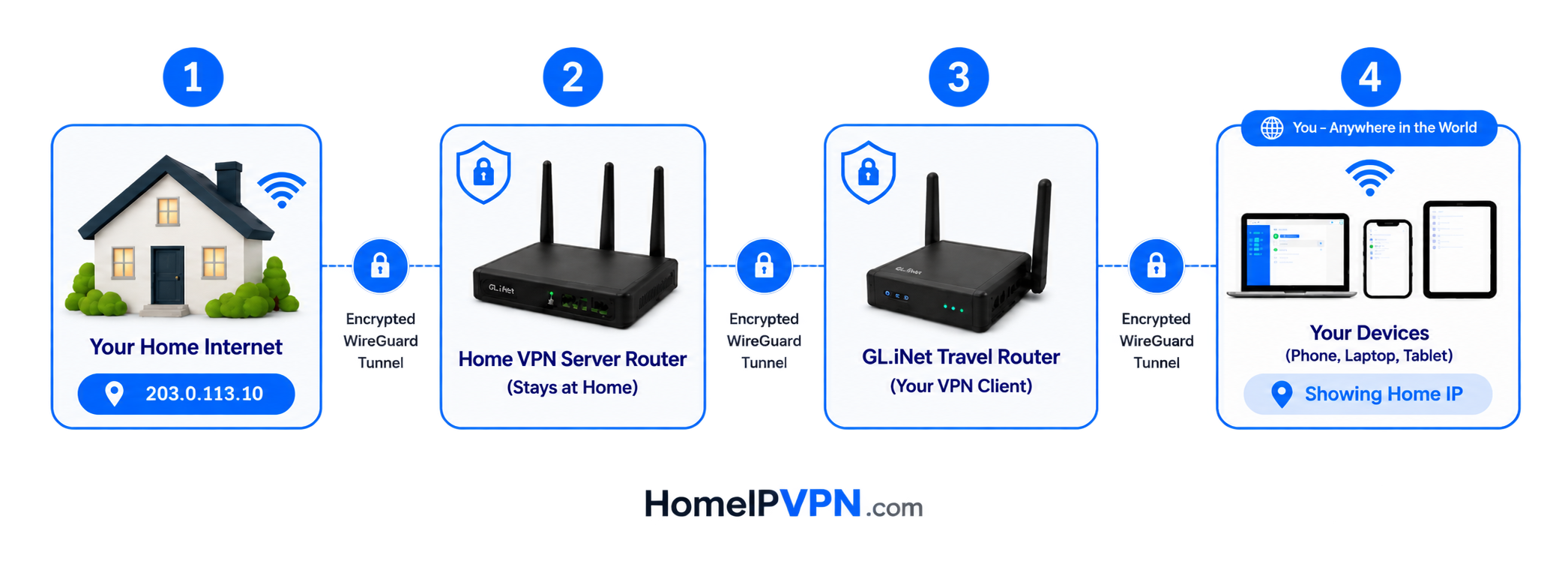
Zero technical skills required. We build a secure residential home vpn system for you, and that's how it works.
They give you a shared datacenter IP that rotates. Banks and employers keep lists of those IPs, so you get flagged even though you are using a VPN.
This is your own home IP, tunnelled from your house. No pool, no sharing, no rotation. It is the exact address your employer already trusts.
Your real home city is detected in your browser only. Nothing is stored.
Why Not Just Use a Regular VPN?
Corporate IT departments have gotten smarter. Here's why standard VPN apps fail digital nomads and how our hardware-based residential home internet IP keeps you completely hidden.
Regular VPN Apps
Commercial IP Addresses
NordVPN, ExpressVPN etc. use known datacenter IPs. IT easily flags these as suspicious proxy usage.
Software Left on Work PC
Requires installing an app on your work laptop, which MDM tools monitor and often block.
High Risk of IP Leaks
If the app crashes or Wi-Fi drops momentarily, your real location pings the company server immediately.
HomeIPVPN for Travel
100% True Residential IP
Traffic goes physically through your actual home router. To IT, it looks exactly like you're sitting on your couch.
Hardware-Level Routing
Your laptop connects to your travel router's Wi-Fi network. Zero software on your work computer.
Hardware Kill-Switch
If the VPN tunnel drops, the router cuts internet instantly. Zero chance of leaks ever.
COMPATIBILITY
Works With Everything You Use
Seamlessly compatible with your existing devices and enterprise software. Zero software on your work computer. Just connect to your travel router's Wi-Fi.
One-Time Setup Fee. Zero Monthly Subscriptions.
Pay once for 1-on-1 expert configuration. Own your hardware and private residential IP VPN tunnel forever.
Home IP VPN System
- 1-on-1 Remote Screen-Share Engineering Setup
- BYOH (Bring Your Own Hardware)
- Single User Config (No Static IP Required)
- Unlimited Bandwidth
- Bypass Geo-Restrictions
- Stealth VPN Mode for Restrictive Hotel Wi-Fi Networks
- Use Home IP Anywhere in the World
- 30 Days of Free Technical Assistance & Support
Pre-Travel Audit & Advisory
- 1 Hour Live Consultation with Senior Network Engineer
- Home ISP Modem Compatibility & CGNAT Audit
- Tailored GL.iNet Hardware Model Recommendation
- Pre-Travel Readiness Checklist & Troubleshooting Guide
What Remote Workers Say
Real users who replaced their commercial VPN with a personal HomeIPVPN setup.
"I work from coworking spaces in Lisbon and Bali. My company IT used to flag my ExpressVPN IP. Since switching to HomeIPVPN through my router at home, my connection looks exactly like I'm sitting in my apartment in Portland. No flags, no leaks."
"The hardware kill-switch is what sold me. I travel for months at a time and can't risk my work laptop leaking my real location. The $79 consultation mapped out exactly which router I needed. Setup was done the same week."
"I compared speed tests before and after. With WireGuard on my travel router, I keep about 92% of my home line speed. Much faster than the commercial VPN I was using, and my work IT never sees anything suspicious."
Travel VPN Tools
Quick checks you can run right now, no account needed.
Frequently Asked Questions
Everything you need to know about our HomeIPVPN for Travel, Digital Nomads & Remote Work setup service.
How does Home IP VPN differ from standard commercial VPNs?
Are there any recurring monthly or annual fees?
Do I need advanced networking or technical skills to set this up?
What travel router models do you support under BYOH (Bring Your Own Hardware)?
What VPN protocols are supported on the travel vpn routers?
Which ISPs are supported with your Home IP VPN for Travel Setup Service?
What if I only need a fixed USA/UK data center IP, can you help setting up my travel VPN router with it?
Do I need to have a Static IP Address for using Home IP VPN?
 Chat with us
 Hi! How can we help you?