REMOTE WORK & DIGITAL NOMAD
How to Find Cafes With WiFi Fast Enough for Video Calls
It is 1:47pm, your big client call starts at 2:00, and you are standing outside a cafe that looked perfect on the map, phone in hand, running a speed test on…
✓What “fast enough for video✓Research before you go: reading✓The arrival test: sixty seconds
Quick Answer
Finding cafes with WiFi fast enough for video calls takes a little detective work: check reviews for remote work mentions, run a speed test before ordering, ask staff about the connection during busy hours, and always have a mobile hotspot ready as backup. Look for cafes with fiber connections, plenty of outlets, and a clientele that includes other laptop workers. Never trust a call to untested WiFi.
- Test first: Run a speed test on arrival; you need stable upload speed, not just fast downloads.
- Ask staff: Ask when the WiFi is busiest and whether the connection is fiber; honest answers save bad calls.
- Backup: Keep your phone hotspot ready; cafe WiFi degrades as the cafe fills up.
- Stable logins: Hopping between cafe networks confuses fraud systems, so a constant home IP from HomeIPVPN keeps accounts steady.
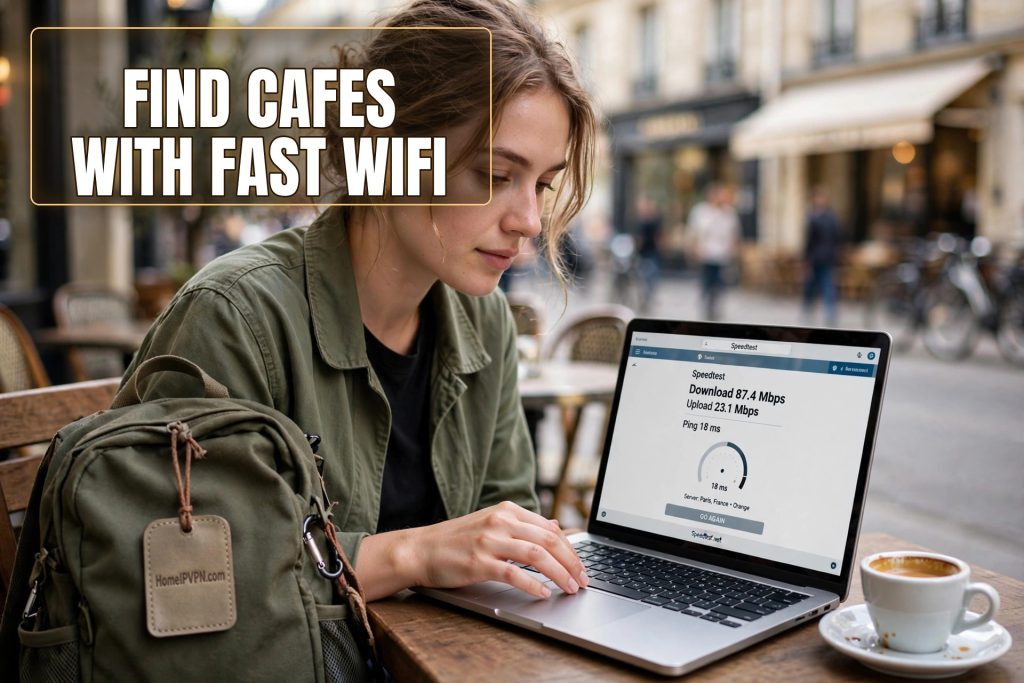
It is 1:47pm, your big client call starts at 2:00, and you are standing outside a cafe that looked perfect on the map, phone in hand, running a speed test on their WiFi from the doorway like a very specific kind of burglar. Download: 45 megabits. Upload: 3. The upload number is the one that matters, and 3 is the number that ruins calls.
You walk in anyway, because the next cafe is fifteen minutes away and time is short. At 2:04, mid sentence, your video freezes. At 2:06, you are that person apologizing while reconnecting from a phone hotspot in the corner. We have all been that person. This guide is about never being that person again.
What “fast enough for video calls” actually means
Most people check the download number and stop thinking. For video calls, the upload number is the boss. A typical group video call needs roughly 2 to 4 megabits per second of stable upload for decent quality, more if you are sharing your screen or presenting. The keyword is stable: a connection that tests at 10 megabits upload but drops to 1 every few minutes will give you a worse call than a steady 4.
Latency matters too, though you cannot easily fix it from a cafe. High latency, the delay between you speaking and others hearing, makes conversations feel awkward and interrupt driven. Satellite or overloaded connections often have this problem. If your test shows latency above 150 milliseconds, expect a slightly stilted call even if the speeds look fine.
The practical threshold for a cafe you can trust with an important call: at least 10 megabits down, at least 5 megabits up, latency under 100 milliseconds, and those numbers holding steady across two tests taken a few minutes apart. Anything less is fine for email and light work but not for the call that matters.
Research before you go: reading reviews like a detective
The best cafe scouting happens before you leave your accommodation. Review sites and maps are full of signals if you know how to read them. Search reviews for the words “laptop,” “work,” “wifi,” and “outlet.” A cafe with multiple reviews mentioning good WiFi and people working is a cafe where the infrastructure has been tested by people with the same needs as you.
Photos are evidence too. Review photos showing laptops open on tables, people working with headphones, or visible power outlets along the walls tell you this is an established work spot. Photos showing only latte art and interiors tell you it is a beautiful cafe that may or may not function as an office. Both are useful data.
Nomad specific resources help enormously. There are apps and websites where remote workers log cafes with WiFi speeds, outlet availability, and noise levels, essentially a global database of tested work spots. Check whether your city is covered before you arrive. A ten minute search can save you a week of trial and error, and the speed numbers logged by other workers are far more trustworthy than any cafe’s own claims.
Local nomad groups and forums are the final layer. A quick post asking for video call safe cafes in a specific neighborhood will usually get specific, current answers, including warnings about places whose WiFi collapsed since the last database update. The nomad community is generous with this intel because everyone has been burned.
The arrival test: sixty seconds that save the call
Make the speed test a non negotiable arrival ritual. Walk in, connect to the WiFi, and run a test before you order, before you sit down, before you commit. This takes sixty seconds and it is the highest value minute in the cafe worker’s day. If the numbers fail, you smile, thank them, and leave. No sunk cost, no awkward mid call escape.
Test twice, a few minutes apart, because cafe WiFi is a living thing. The first test catches the baseline. The second catches whether the baseline is stable or whether the connection is already degrading as the lunch crowd arrives. If the second test is much worse than the first, the network is congested and your 2pm call will be worse still. Move on.
Test the upload specifically. Many speed test apps show a big download number and hide the upload in small text. Train yourself to look at the small text first. A cafe with 100 down and 2 up is a cafe that will betray you on every call, and the big download number is the bait.
Also note the network setup. A cafe with a single network name for everyone is sharing all its bandwidth with every customer streaming video at the next table. A cafe with a separate staff network, or better yet, noticeably professional setup, is managing its bandwidth deliberately. You cannot always tell from the phone screen, but when you can, it is a good sign.
Questions to ask the staff
Staff usually know the truth about their WiFi, and most are happy to share it if you ask well. The key is asking specific questions rather than “is the WiFi good,” which gets an automatic yes everywhere on earth.
Ask: “Does the WiFi stay fast when the cafe is full?” This is the question that matters, and the hesitation before the answer is the answer. Ask: “Is there a time limit on the WiFi?” Some cafes rotate passwords or kick devices after an hour, which you want to know before a two hour call block. Ask: “Where is the signal strongest?” Staff know the dead corners. And if you are planning to become a regular, ask: “Do many people work from here?” The answer tells you whether you will be welcome or tolerated.
Ask in the local language if you can manage even a few words. The effort is noticed and the answers get more honest. “WiFi rapido?” with a hopeful expression has unlocked more truthful answers than fluent demands ever have.
One more question for the important days: “Is there a quieter time I should come back for a video call?” Staff know their rush patterns intimately, and they will often steer you to the golden hours you would never have guessed. This single question has saved more calls than any speed test.
Reading the physical space
The room itself tells you most of what the speed test confirms. Outlets are the first signal: a cafe with outlets at every table, or a dedicated counter with outlets and USB ports, has designed for laptop workers. A cafe with one outlet behind the plant is telling you something else.
Seating layout is the second signal. Long communal tables, counter seating facing the wall, and nooks with small tables all say “stay a while.” Tiny round tables designed for two espressos say “drink and leave.” Match your plans to the furniture, not your hopes to the furniture.
Noise level is the third signal, and it changes by hour. Visit a candidate cafe at the time you actually plan to work there, not just whenever is convenient. The peaceful morning spot can become an echoing lunch hall, and the quiet afternoon hideout can fill with an after school crowd at four. Time of day is part of the venue’s identity. Scout accordingly.
Other laptop workers are the strongest signal of all. If you walk in and see three people working quietly with headphones, the WiFi works, the staff tolerates it, and the social contract is established. Join them. If you walk in and see zero laptops in a full cafe, there is usually a reason, and the reason is rarely that nobody thought of it.
The backup plan: non negotiable
Here is the rule that separates professionals from optimists: never trust an important call to a single cafe connection. The backup is your phone hotspot, configured and tested before the call, with enough data loaded to carry the full meeting. This is not paranoia. Cafe WiFi fails in ways you cannot predict: the router gets rebooted, the lunch crowd saturates the bandwidth, the staff changes the password mid afternoon.
The handoff drill matters. Know exactly how to switch your laptop to your phone’s hotspot in under thirty seconds, and do a practice switch once, calmly, before the stakes are real. When the cafe WiFi dies mid call, the difference between a ten second blip and a five minute disaster is whether you have done the motion before.
For the truly critical calls, the job interview, the big pitch, the client you cannot afford to lose, consider not using a cafe at all. A coworking space day pass, a hotel business center, or even your rental with tested WiFi are all more controllable environments. Cafes are wonderful for 90 percent of remote work. The other 10 percent deserves a venue you control.
The invisible problem: network hopping and your accounts
There is one more thing the speed test cannot tell you, and it matters more than most cafe workers realize. Every cafe is a new network, and every new network is a new data point for the fraud systems guarding your bank accounts, your email, and your work tools. Test six cafes in a week and you have generated six unfamiliar login locations. The algorithm does not know you are comparison shopping for WiFi. It knows your credentials are appearing in places they have never appeared before.
The cruel irony is that the most diligent cafe scout, the person testing every option and optimizing for the best connection, generates the most suspicious looking pattern. Diligence looks like fraud to a machine. And the freeze always lands at the worst moment, because the worst moment is when you are actively using your accounts.
The solution is to make the network irrelevant. When all your traffic routes through a single stable home IP address, the cafe scout’s week looks like a week at home: same address, same pattern, nothing to flag. HomeIPVPN gives you that constant address through your own residential connection, so you can test every cafe in the city and your bank never notices you left the house. Scout freely. Log in consistently.
Building your cafe shortlist
The end goal of all this scouting is a shortlist: three to five tested, trusted cafes in your neighborhood, each vetted for speed, outlets, noise, and welcome. With a shortlist, the daily decision disappears. You rotate based on mood, crowd, and time of day, always landing somewhere known good. This is the cafe worker’s version of a professional setup, and it takes about a week to build in a new city.
Maintain the list lightly. Cafes change: new management, new router, new no laptop policy. If a regular spot degrades, replace it without sentimentality. And keep scouting casually even after the list is built, because the perfect new spot opens when you least expect it, and finding it first is one of the small joys of the lifestyle.
The whole system, research, arrival test, staff questions, physical reading, backup plan, shortlist, takes a little effort up front and then runs on autopilot. Within two weeks in a new city, you will have better work venues than most locals, and you will have earned them the reliable way: by testing instead of hoping.
That testing mindset is the real skill here, and it applies beyond cafes to every invisible layer of remote work. Test the WiFi. Test the backup. And test the thing nobody tests: what your accounts see when you log in. A constant home IP is the one test you only need to run once, because HomeIPVPN keeps it steady from the first cafe to the fiftieth. If you would rather have someone set it up and verify it works before your next scouting day, the Pre-Travel Audit & Advisory session is 1 hour, costs $79, and that fee comes straight off the $279 Secure Home IP VPN System session if you go ahead.
Test before you order. Your future self, mid call and unfrozen, says thanks.